Yazi is an open-source terminal file manager built in Rust that utilizes non-blocking async I/O for rapid file operations. It provides users with built-in image previews, code highlighting, and a concurrent plugin system directly from the command line.
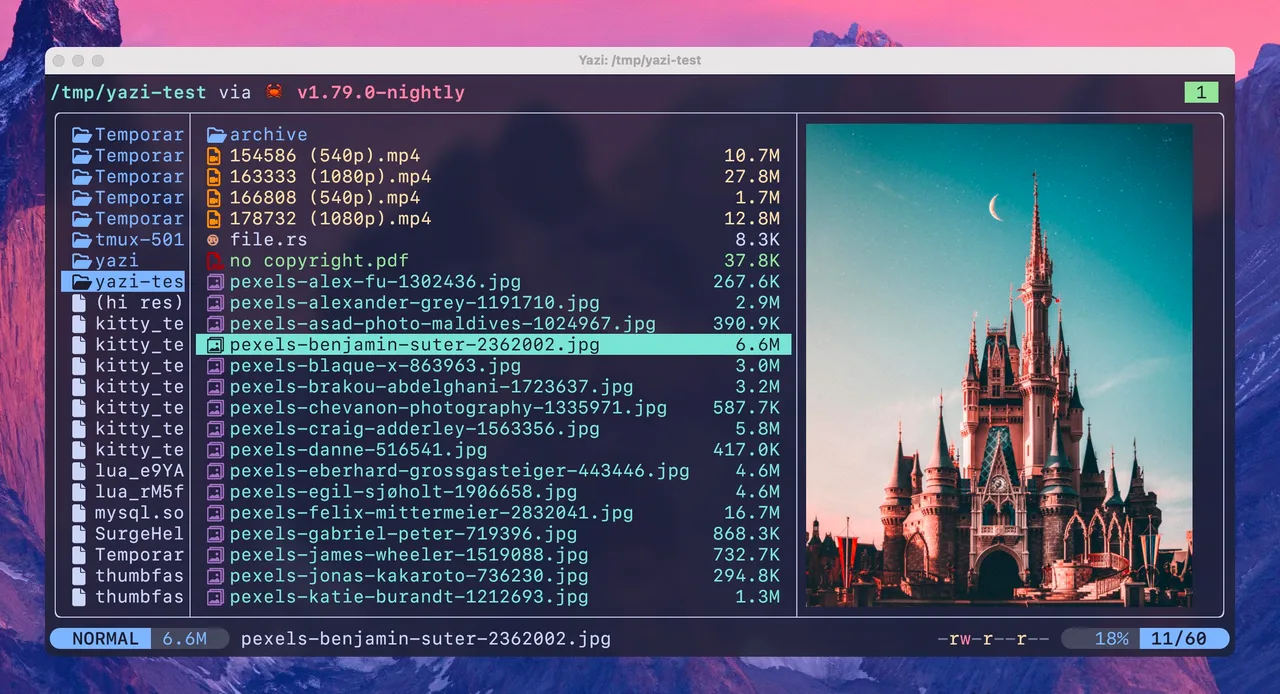
During my testing on Windows 11, Yazi handled heavy directories with zero lag thanks to its Rust foundation and CPU task distribution. The Vim-like input makes moving through nested folders incredibly fluid without relying on a mouse. It runs perfectly inside Windows Terminal, rendering images directly in the prompt while using barely any system memory.
Features of Yazi
- Async task scheduling ensures heavy file transfers or archive extractions happen in the background without freezing the interface.
- Built-in image decoding renders media previews directly in compatible terminals like Windows Terminal using the Sixel graphics format.
- Concurrent plugin system allows for custom UI tweaks and functional add-ons written in Lua, keeping the core app bloat-free.
- Vim-like keybindings offer quick movement, cross-directory selection, and bulk renaming without ever leaving the keyboard.
- Virtual filesystem support lets you manage remote files and connect custom search engines locally.
System Compatibility
Yazi supports Windows, macOS, and Linux. For Windows users, it requires Windows Terminal version 1.22.10352.0 or higher for full image preview support, and it runs natively on x64 and ARM architectures.
Why Choose Yazi?
Most graphical file managers are heavy, ad-supported, or take seconds to load large directories. Yazi delivers instantaneous folder switching and media previews inside a completely free, ad-free environment that respects your hardware resources.